.png?width=350&height=78&name=Black-on-Transparent_GlassHouse-Logo%20(1).png)
See a More Complete View of Your Results
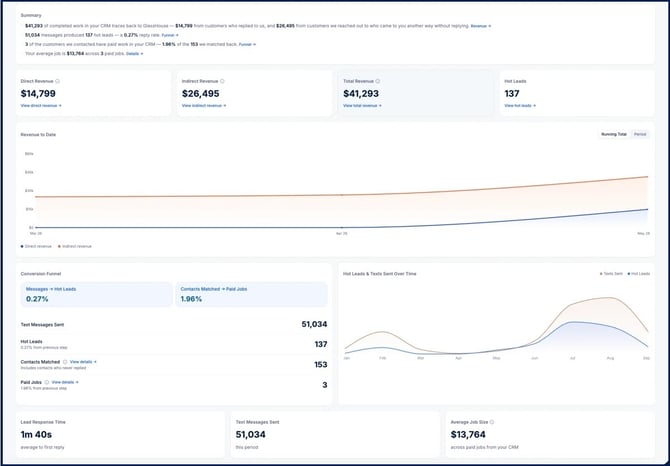
An improved Performance Dashboard is rolling out this month, giving you greater visibility into how GlassHouse contributes to new business.
With a direct CRM integration, you’ll be able to see activity from GlassHouse alongside customer and revenue data from your CRM—without relying on manual matchbacks.
What You’ll Be Able to Track
- Direct revenue: See revenue from prospects who became Hot Leads in GlassHouse and later booked with your business.
- Indirect revenue: Identify customers who were first reached through GlassHouse but converted through another channel, such as your website, a phone call, or an online search.
- Funnel performance: View a snapshot of prospecting activity, conversions, attribution, and revenue in one place.
- Customer-level details: Dig into the prospects and customers included in your results for a clearer view of how GlassHouse influenced the journey.
Integration Required
The revenue and attribution features require a direct CRM integration with GlassHouse. If your integration is not yet connected, contact success@glasshousepro.com to discuss available options.
💳 Purchase and Manage Credits In-App
In-app credit management is now live. Authorized users can purchase credits directly in GlassHouse, helping prevent active campaigns from stopping because the account has run out of credits.
What You Can Do
- Buy credits in GlassHouse: Purchase additional credits using the payment method already on file.
- Set up automatic refills: Choose the balance that triggers a refill and the number of credits added each time.
- Transfer credits between organizations: If you are an administrator for multiple organizations, move available credits between eligible accounts.
Purchase Additional Credits
- Select your credit balance in GlassHouse.
- Select Buy Credits.
- Choose the number of credits you want to purchase.
- Review the purchase details and complete the transaction.
Only an authorized Billing Administrator can purchase or manage credits. Authorized users will see the blue Buy Credits button on the Credit Balance page.
.png?width=670&height=389&name=CleanShot%202026-09-11%20at%2010.53.07@2x%20(1).png)
| Important Note | Details |
|---|---|
| Don’t see Buy Credits? | Contact sales@glasshousepro.com to confirm or update the authorized user for your organization. |
| Need help choosing a refill amount? | Your GlassHouse team can help you determine an amount based on your campaign activity and credit usage. |
🔥 Stay on Top of Hot Leads
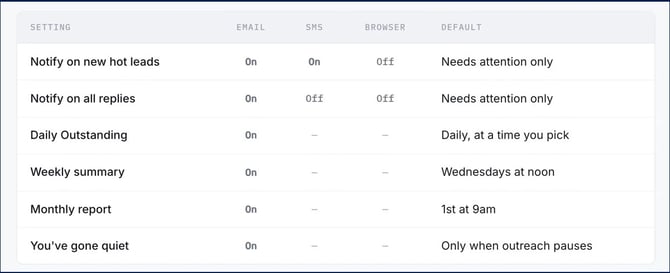
Enhanced Hot Lead alerts are rolling out to help ensure important opportunities do not slip through the cracks. New browser notifications and clearer in-app indicators will make it easier to see when a lead needs your attention.
What’s New
- Browser notifications: Receive an alert even when you are working in another browser tab.
- Unseen-lead indicators: Quickly identify new activity on the Sales Board through visual indicators and counts in the sidebar and browser tab.
- Scheduled email summaries: Choose when you want outstanding leads delivered to your inbox.
- More notification control: Decide whether you want alerts for all Hot Lead activity or only when your attention is required.
GlassHouse AI can continue managing conversations while your notification preferences determine how closely you want to follow the activity.
🔜 Coming Soon
We’re continuing to develop tools that make prospecting faster and help you decide who to reach next.
AI-Generated A/B Message Variants
Automatically create message variations for individual sends or complete campaigns, making it easier to test different approaches.
Suggested Prospect Groups
Receive recommendations for who to contact next based on factors such as upcoming jobs, weather, past customers, recent movers, and more.
💬 Need Help?
If you have questions about these updates, your integration, or your credit permissions, reach out to the GlassHouse team. We’re here to help you prospect more effectively, generate more opportunities, and get the most from GlassHouse.