.png?width=350&height=78&name=Black-on-Transparent_GlassHouse-Logo%20(1).png)
💡 What It Is
Nudges & Notifications help you stay informed about hot lead activity, campaign performance, and account engagement. Each user can choose which notifications they receive and how they receive them without changing another teammate’s settings.
⚙️ Access Your Notification Settings
- Hover over your name in the bottom-left corner.
- Select Profile.
- Scroll to Notifications.
🔔 Choose Your Notifications
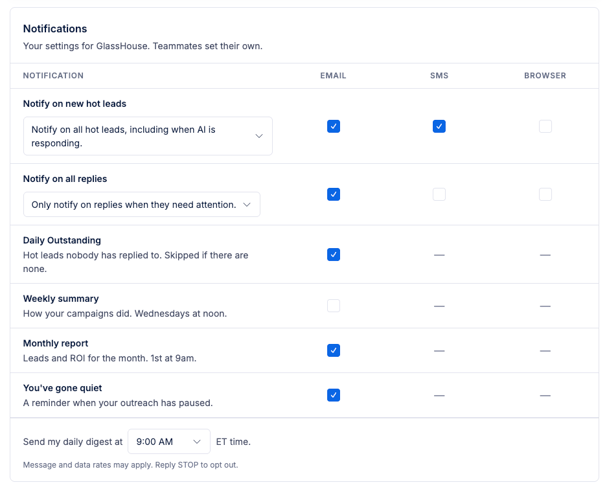
Use the notification grid to select how you want to receive each available notification. Depending on the notification, delivery options may include:
- SMS
- Browser
Hot Lead Activity
Hot Lead Activity combines the previous hot lead alerts into one setting. Use the dropdowns to choose which hot leads and replies should trigger a notification, then select your preferred delivery methods.
When available, notification links open directly to the lead conversation so you can review and respond quickly.
Daily Outstanding
Receive a daily email listing hot leads that have not received a response. The email is skipped when there are no outstanding hot leads.
Use the time selector at the bottom of the notification panel to choose when the digest is sent. The selected time is based on your organization’s time zone.
Weekly Summary
Receive a weekly email summarizing your campaign performance.
Monthly Report
Receive a report on the first of each month showing the previous month’s:
- Hot leads
- Leads won
- Credits spent
You’ve Gone Quiet
Receive an email reminder after 14 and 30 days without outreach activity. These reminders stop automatically once your organization begins sending outreach again.
🌐 Enable Browser Notifications
Browser notifications are turned off by default and must be enabled separately on each device and browser you use.
- Select the Browser checkbox for an available notification.
- When prompted, allow notifications from GlassHouse in your browser.
- Repeat these steps on any additional device or browser where you want to receive notifications.
Selecting a browser notification opens the related lead conversation directly in GlassHouse.
👀 Identify Unviewed Hot Leads
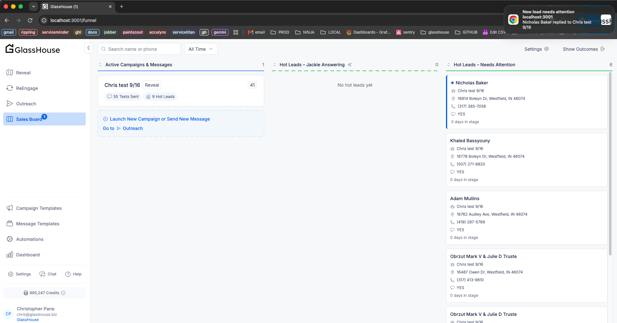
GlassHouse marks hot leads you have not yet viewed so you can quickly identify new activity.
Unviewed hot leads may appear with:
- A count beside Sales Board in the navigation menu
- A count in the browser tab title
- A blue marker on the lead card
Seen status is tracked separately for each user. Opening the lead clears your unviewed indicator without affecting your teammates.
📌 Important Notes
| Topic | Details |
|---|---|
| User-specific settings | Each teammate manages their own notification preferences. |
| SMS notifications | A valid phone number and SMS opt-in are required. Message and data rates may apply. |
| Browser permissions | Browser notifications must be allowed separately on each device and browser. |
| Billing notices | Billing notices are transactional and are always sent. They cannot be turned off from the notification settings. |
| Daily digest time | The selected delivery time follows the organization’s time zone. |