.png?width=350&height=78&name=Black-on-Transparent_GlassHouse-Logo%20(1).png)
🚀 Start Outreach
Outreach requires a Prospect Group (from Reveal, ReEngage, or Import).
Once you have a group, you can:
- launch a campaign
- send a one-time message
👉 No messages = no activity or stats
🚀 Launch a Campaign
- Locate your Prospect Group
- Select Launch a Campaign
- Complete the launch flow:
- Select Template → choose a campaign template (optional)
- Review Configuration → message sequence, email setup, automations
- Review & Launch → confirm and launch
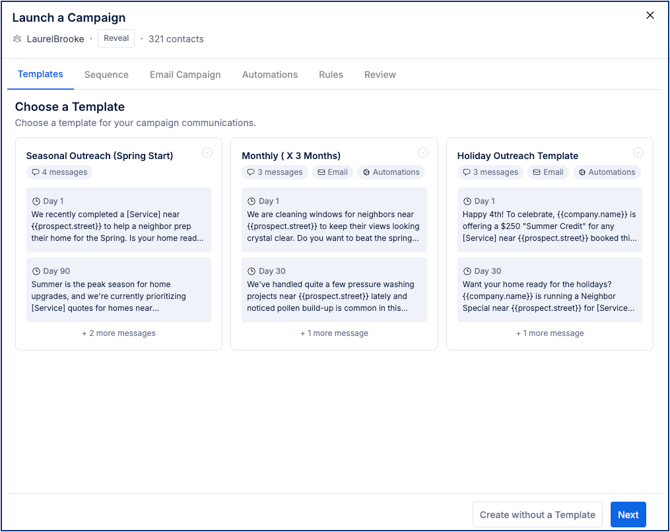
👉 Each campaign is created for one Prospect Group only
👉 Templates provide a starting point — you can edit:
- message content and timing
- email configuration
- automations
👉 For full details, see the Campaign Templates Guide
⚡ Send a One-Time Message (Without Campaign)
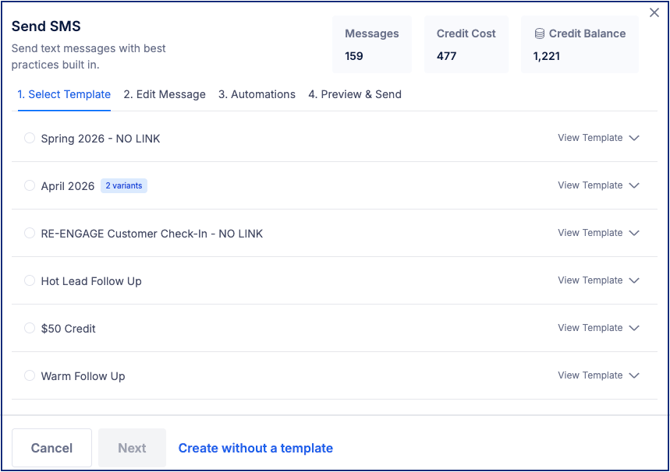
- Select the send icon ( > ) next to Launch a Campaign
- Complete the flow:
- Select Template
- Edit Message
- (Optional) Automations
- Preview & Send
📁 View & Manage Prospect Groups
Navigate to Outreach to view all Prospect Groups.
Each group shows:
- contact count
- date created
- status
- source
Use tabs to filter:
- All
- Reveal
- ReEngage
- Prospect Import
Use search to find specific groups quickly.
⚙️ Take Action on a Group
- Click the three-dot menu in the Actions column
- Select an option:
- Send to HubSpot
- Send to Instantly
- Send Email with Gmail
- Export
- Archive
- View on Sales Board
⚠️ Important Notes & FAQs
| Topic | Details |
|---|---|
| Campaign Structure | Each campaign is tied to one Prospect Group |
| Templates | Templates are starting points and can be edited during launch |
| Editing Campaigns | Active campaigns can be updated from the Sales Board |
| Campaign Timing | Message timing cannot be edited after launch |
| Ending Campaigns | Campaigns can be ended; replies and hot leads remain visible |
| Prospect Reuse | A 30-day cooldown applies after the last message is sent |
| Reveal vs Universal Plans | Reveal Plans use one-time sends; Universal Plans support campaigns |
| Property Details | Prospect Group tables now support expandable rows that display additional property details including Home Value, Home Size, Lot Size, Last Sale Date, and Year Built |
| Mapped Areas & Segments | Prospect Groups now include Mapped Areas (Reveal) and Segment (ReEngage) tabs to display sub-groups, applied filters, and mapped shapes |
| Activity Tab | A new Activity tab tracks Prospect Group actions including Campaign Launches, SMS activity, Exports, Gmail sends, HubSpot sends, Sent to Instantly actions, and Archived actions |
| Historical Activity | Activity tracking is recorded on a go-forward basis only. Historical activity prior to this release is not available |
| No stats showing | You must send outreach first |
🧩 Pro Tip
Use templates to launch quickly, then adjust messaging and automations as needed.