.png?width=350&height=78&name=Black-on-Transparent_GlassHouse-Logo%20(1).png)
💡 What It Is
The Change Organization setting lets you switch between organizations you have access to—without logging out.
⚙️ How to Change Organizations
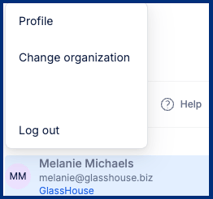 Hover over your name in the bottom-left corner
Select Change Organization
Select the Organization dropdown
Select the organization you want to access
Your view will update automatically
⚠️ Important Notes & FAQs
| Question / Scenario | Answer |
|---|---|
| I don’t see another organization | You may not have access—contact your admin |
| Will this affect my campaigns? | No—each organization is completely separate |
| Do I need to log out to switch? | No—switch instantly from the menu |
| What organizations will I see? | Only organizations your user is assigned to will appear |
| Will my permissions change? | Possibly—access levels can vary by organization |