.png?width=350&height=78&name=Black-on-Transparent_GlassHouse-Logo%20(1).png)
💡 What It Is & When You Use It
Campaigns are SMS messages sent to a Prospect Group over time to automatically follow up with leads.
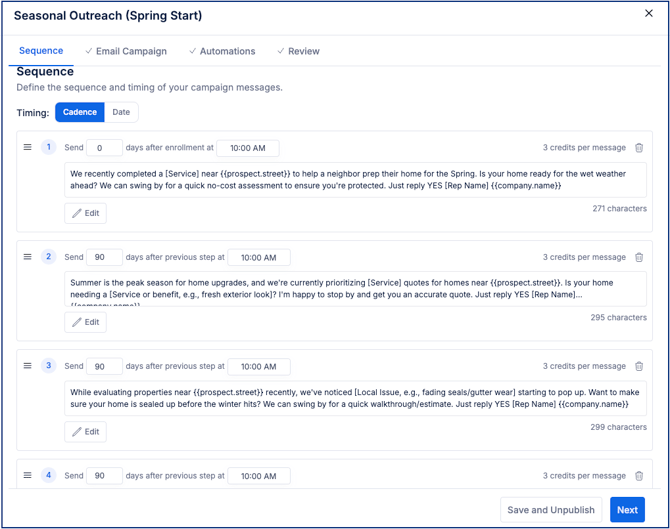
Each campaign follows a sequence of messages built in Templates, sent based on timing you define.
Each campaign is tied to one Prospect Group, making it easier to manage outreach and track engagement.
Use Campaigns when you want to:
- Send SMS outreach to a Prospect Group
- Follow up automatically over time
- Stay consistent without needing to manually resend messages
🚀 Create a Campaign
- From Campaign Templates, select Create New Template
- Complete setup
- Sequence
- Timing: Cadence or Fixed Date
- Message Body
- + Add Step (optional)
- Configure automations and rules
- Review and launch
⚙️ How Campaigns Work
Once your campaign is live, everything runs automatically in the background.
- Contacts are enrolled from your Prospect Group
- Each phone number is treated as its own enrollment
- Messages are sent in steps over time based on your sequence
- The system automatically handles:
- Send timing
- Quiet hours (9 AM – 8 PM in the contact’s local timezone)
- Do Not Call filtering
If something blocks a message, the system will skip or pause as needed.
⚠️ Important Notes & FAQs
| Topic | Details |
|---|---|
| Template Required | A published template is required unless creating without a template |
| SMS Only | Campaigns currently support SMS only |
| Prospect Group Limit | Each campaign is tied to one Prospect Group |
| Editing Limits | Editing is restricted once a campaign is active |
| Message Not Sent | May be blocked by DNC, recent outreach, or quiet hours |
| Multiple Campaigns | Contacts cannot be enrolled in more than one campaign |
| Credits | Campaigns pause automatically if credits are insufficient |
💡 Tips
- Start simple — one campaign, one clear message
- Use sequences for follow-up, not rapid sends
- Keep messages short and conversational
- Duplicate templates instead of editing live ones