.png?width=350&height=78&name=Black-on-Transparent_GlassHouse-Logo%20(1).png)
💡 What It Is + Why You Want to Use It
Automations handle what happens after a lead replies—so you don't have to.
When a lead responds positively, Automations can automatically send a reply, trigger a webhook, or hand the conversation to AI. AI-powered conversations currently support SMS only.
Use Automations to:
- respond instantly when a lead replies
- ensure every Hot Lead receives immediate follow-up
- reduce manual work
- keep responses consistent across your team
- scale outreach without missing opportunities
Automations are built around a Positive Reply Automation, which runs on the first positive reply.
⚙️ How to Use Automations
Access Automations
- From the main menu, select Automations.
- You'll land on the Automations page.
- Choose a tab:
- AI Responder
- Actions
Configure your AI Agent
From the AI Responder tab and New Agent
Configure the agent:
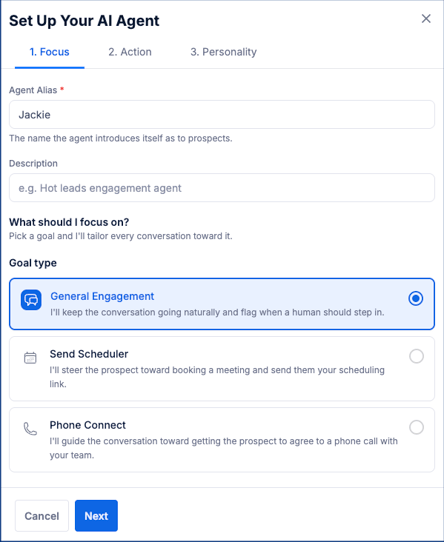
Focus
Configure how your AI Agent introduces itself.
Name / Alias
Description
Goal Type
- General Engagement
- Send Scheduler
- Phone Connect
Action
Configure what happens during the conversation.
Personality
Choose your AI Agent's communication style.
- Professional
- Casual
- Friendly
💡 Note: AI Responder is currently available for SMS conversations only. Email Hot Leads support Positive Reply Automations and webhooks, but AI responses are not yet supported.
Actions: Configure what happens during the conversation.
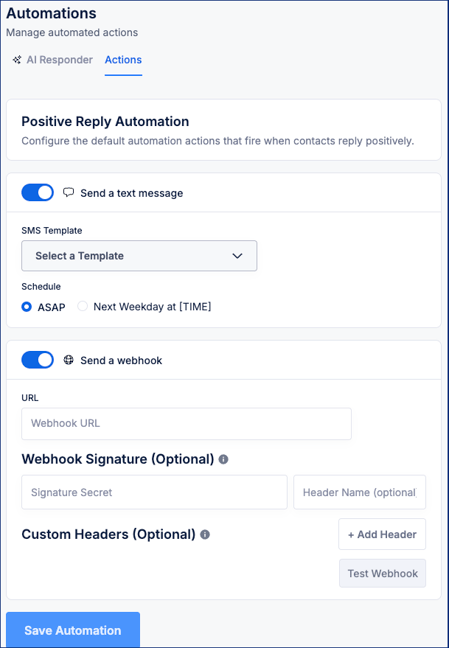
Configure an Automatic Reply:
Toggle Send a message ON (optional)
Select a Template
Choose a schedule:
- ASAP
- Next Weekday at [TIME]
Send a Webhook.
Toggle Send a webhook ON (optional)
Enter Webhook URL
Add: Webhook Signature (secret + header name)
Custom Headers(Optional)
Test Webhook
Save Automation
Test AI Responder
- Scroll to the new Start Conversation demo
- Enter your outreach message
- Click Start Conversation
- Simulate replies to see how AI responds
⚠️ Important Notes & FAQs
| Topic | Details |
|---|---|
| Trigger | Automations run on the first positive reply for each enrollment. |
| AI Availability | AI Responder is available on all credit plans. |
| Scope | Automations are configured per campaign, not globally. |
| Multiple Actions | SMS and webhooks can run together. |
| AI Conversations | AI responds naturally, follows the configured goal, and respects follow-up settings. |
| Phone Confirmation | You can choose whether AI asks prospects to confirm their phone number. |
| Form Submissions | AI won't ask form-submission leads to confirm a phone number they already provided. |
| Manual Takeover | When a team member takes over a conversation, any pending AI responses are cleared so only manual replies are sent. |
| Conversation Limits | AI conversations automatically escalate to your team when they reach system limits or require human assistance. |
| Overrides | Each campaign can use the default automation settings or override them individually. |
| Lead Names | Outbound campaign messages automatically clean lead names to create more natural greetings. |
🧩 Pro Tip
Configure your Automations before launching a campaign.
This ensures every Hot Lead receives an immediate response, even when your team isn't available. If AI Responder is enabled, it can continue the conversation until a team member needs to step in.