.png?width=350&height=78&name=Black-on-Transparent_GlassHouse-Logo%20(1).png)
Performance Dashboard Overview
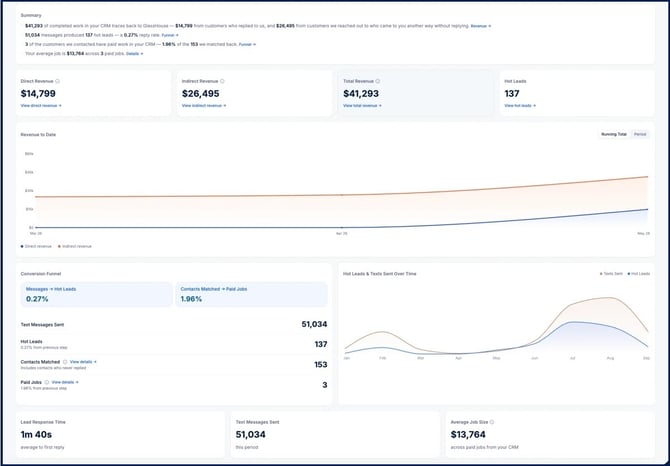
The Performance Dashboard helps you understand how GlassHouse prospecting contributes to leads, customers, and revenue. When your CRM is directly integrated with GlassHouse, the dashboard combines outreach activity with customer and revenue information from your CRM to provide a more complete view of your results.
📊 What the Performance Dashboard Shows
The dashboard gives you a high-level view of the prospects reached through GlassHouse and what happened after the initial outreach.
You can use it to review:
- GlassHouse activity: See the prospects reached through your GlassHouse campaigns.
- Funnel performance: Follow the journey from outreach and engagement to customers and revenue.
- Revenue attribution: Review direct and indirect revenue connected to your prospecting.
- Customer details: See which customers and CRM outcomes contribute to your results.
💰 Understanding Revenue Attribution
GlassHouse may influence a customer even when the customer does not respond directly to your message. The dashboard separates direct and indirect revenue to provide a more complete picture of that impact.
| Revenue Type | What It Means | Example |
|---|---|---|
| Direct revenue | Revenue from a prospect who engaged through GlassHouse, became a Hot Lead, and was later recorded as a customer or completed job in your connected CRM. | A prospect replies to a GlassHouse message, your team follows up, and the resulting job is recorded in your CRM. |
| Indirect revenue | Revenue from a prospect first reached through GlassHouse who later converted through another channel without directly responding through GlassHouse. | A prospect receives a GlassHouse message, later visits your website or calls your business, and becomes a customer through that channel. |
🔍 Reading Your Results
Start With the Summary
Use the summary metrics for a quick view of your GlassHouse activity and the outcomes connected to it.
Review the Funnel
The funnel shows how prospects move from outreach toward meaningful business outcomes. Use it to see where prospects are engaging and where additional follow-up may be needed.
Compare Direct and Indirect Impact
Direct revenue shows customers who raised their hands through GlassHouse. Indirect revenue helps identify customers who were reached through GlassHouse but entered your sales process through another channel.
Reviewing both provides a clearer view of the overall impact of your prospecting.
Explore Customer Details
Open the supporting customer information to see which prospects and CRM outcomes contribute to the totals shown.
🔗 CRM Integration Requirements
Revenue and attribution reporting require a supported direct CRM integration with GlassHouse.
The dashboard uses GlassHouse outreach activity together with the customer, job, and revenue information available in your connected CRM.
| Important Note | Details |
|---|---|
| Integration required | Without a supported direct CRM integration, revenue and attribution information may not be available. |
| CRM data matters | Dashboard results depend on the customer, job, and revenue information recorded in your connected CRM. |
| Results may change | Totals can update as new activity and revenue outcomes are recorded in GlassHouse or your CRM. |
❓ Frequently Asked Questions
| Question | Answer |
|---|---|
| Why don’t I see revenue information? | Revenue reporting requires a supported direct CRM integration. Your connected CRM must also contain the customer and revenue information needed for attribution. |
| What is the difference between direct and indirect revenue? | Direct revenue is connected to a prospect who engaged through GlassHouse. Indirect revenue is connected to a prospect first reached through GlassHouse who later converted through another channel. |
| Why can my dashboard totals change? | Totals may update as additional outreach, engagement, customer, job, or revenue information becomes available in GlassHouse or your connected CRM. |
| Does indirect revenue mean the customer replied to a GlassHouse message? | Not necessarily. Indirect revenue is intended to capture customers who were reached through GlassHouse but converted through another path. |
| How can I connect my CRM? | Connect an Integration to Sync Your Clients |
💬 Need Help?
If your dashboard does not show the information you expect or you need help connecting your CRM, contact success@glasshousepro.com.